Your clients tell you what to change,shot by shot.
One link, no account, no app. Your client annotates the film from their phone; you get an edit plan and markers for Premiere, Resolve and Final Cut.
Free, no card needed. Your clients never pay.
Your feedback lands straight in
- Premiere Pro
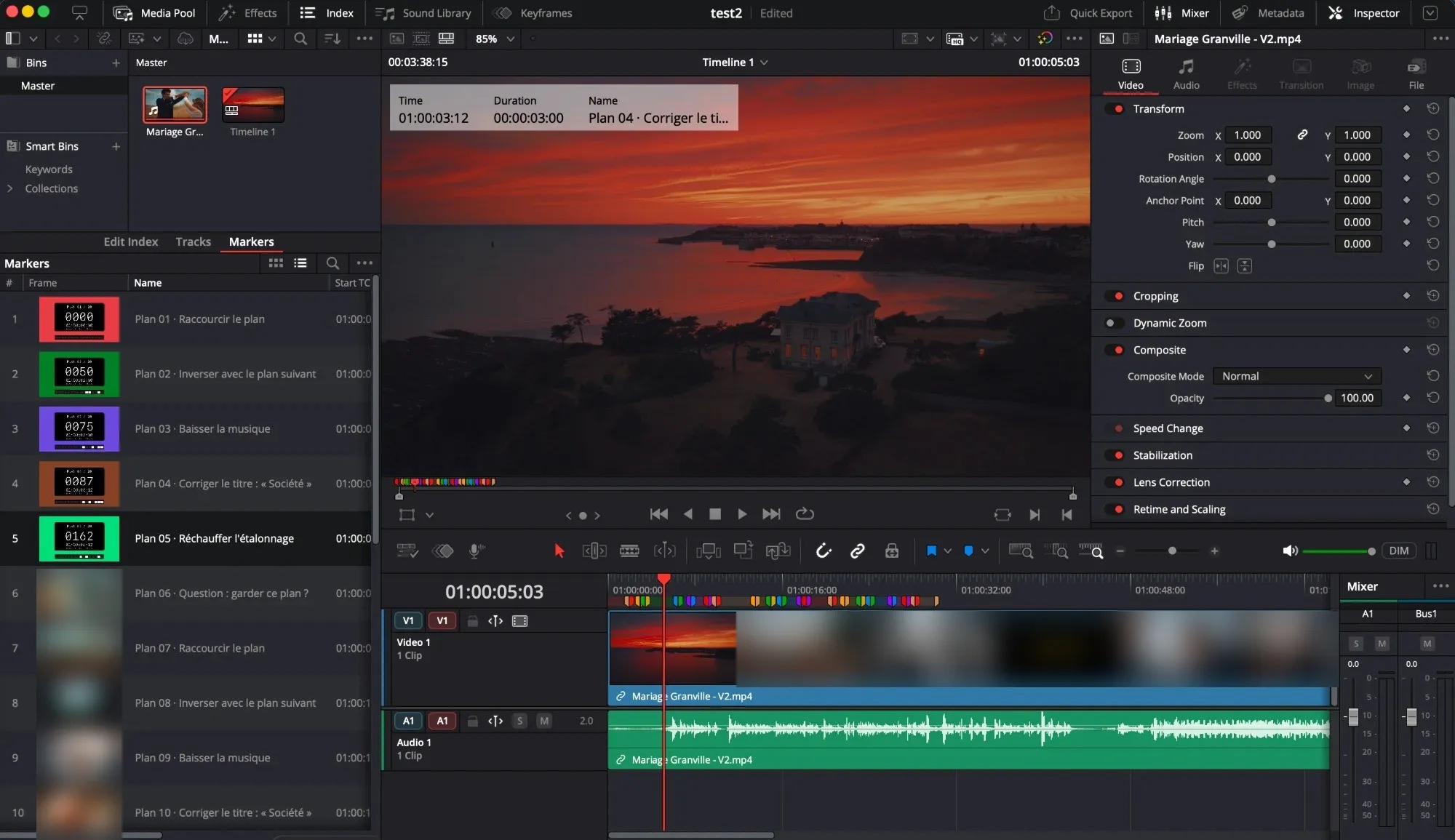
- DaVinci Resolve
- Final Cut Pro
- CSV
- JSON
- Hosted in the European Union
- No trackers on the client link
- No account for your clients
From link sent to film signed off.
One loop, from your client's first viewing to the signed delivery approval.
Your client pauses the film and points at what's wrong:  the cut,
  the pacing,
  the sound,
  a title,
  the image,
  or a question. Every note lands on the right shot of your timeline.
 01
01 02
02 03
03 0406
0406- Shot 01 · Warm up the grade
- Shot 02 · Trim by one second
- Shot 03 · Swap with the next shot
- Shot 04 · Lower the music
- Shot 05 · Fix the title
- Shot 06 · Keep this shot?
From V1 to a signed-off film, in four moves.
- go.noterz.app/r/…01020304
Send
Upload your film: Noterz detects the shots. Send the link to your clients, under your brand, with a password if you need one.
Annotate
Your client pauses, picks a feedback type, writes, draws on the frame or speaks. Every note keeps its exact frame.
- Shot 02 · Trim by one second
- Shot 03 · Swap with the next shot
- Shot 04 · Lower the music
- Shot 05 · Fix the title
Export
When the round closes, feedback is sorted shot by shot. One marker file, and everything is in your timeline.

Deliver
Your client compares V2 with V1, ticks "Looks good" and signs the delivery approval. The final film is ready to download.
A link for your client, a workspace for you.
- 01
The client link
Nothing to install, no account. The film opens on their phone, your client taps "Give feedback", and their first note is sent within seconds. Without a network, notes wait to be sent.
- 02
The edit plan
Feedback is grouped by shot, in film order, with your client's original words. When a note is unclear, the AI asks your client instead of guessing.
- 03
V2 and sign-off
V1 and V2 shots are matched: your client checks every fix, then the decision maker signs. A dated signature, and the final film is ready to download.
- 04
Your brand
Your name, logo and colour on the link, the emails and the PDF. Noterz stays in the background.
Numbers, not adjectives.
1frame
The precision of a note, from your client's phone to your timeline.
0accounts
For your client to create. One link is enough.
37s
To split a 21-minute film into shots.
3editors
Premiere Pro, DaVinci Resolve and Final Cut Pro.
What it changes for you.
Your rounds hold
"Round 2 of 2 included" shows on your client's side. Beyond that, the round is out of scope, and everyone knows before you edit.
Round 2 of 2 included
No more timecode hunting
Every note is anchored to the frame and the shot. No more rewatching the whole film to find "the bit with the music".
Feedback in one go
Several people review the same link, the decision maker says "I'm done". Conflicting opinions surface before you edit, not after.
A project that closes
The delivery approval is signed, dated and kept. The final film goes out, and so does the invoice.
How it works
- 1
Upload your film
Shots are detected automatically.
- 2
Send the link
By email, under your brand.
- 3
Your client annotates
On their phone, no account.
- 4
Export and deliver
Markers, V2, sign-off.
Your feedback, already in your timeline.
One marker file per round, numbered by shot, with the instruction in plain words. Open it in your editor: all that's left is editing.
- Premiere Pro
- DaVinci Resolve
- Final Cut Pro (beta)
- CSV
- JSON
- Edit plan PDF
Made by a video maker.
My clients sent their feedback by email, by voice message, with rough timecodes. I spent more time understanding their notes than applying them. I built Noterz so they could tell me exactly what to change, from their phone, and so everything would land in my timeline.
Simple pricing, per workspace.
Your clients never pay and never need an account.
Discovery
To try Noterz on a real film, end to end.
Free
No card, no time limit
- 1 active project at a time
- 5 GB of storage
- Files up to 4 GB and 30 minutes
- "Sent with Noterz" under your links
Solo
For the independent video maker delivering several films a month.
€19per month
€190per year
€15.83 per month
- 10 active projects at a time
- 200 GB of storage
- Files up to 10 GB and 90 minutes
- Links under your brand only
Studio
For studios running many projects at the same time.
€39per month
€390per year
€32.50 per month
- 30 active projects at a time
- 500 GB of storage
- Files up to 20 GB and 120 minutes
- Links under your brand only
Prices include VAT. Every feature in every plan. Cancel anytime from your workspace.
Frequently asked questions
Does my client need an account?
No. They open the link on their phone or computer, enter their first name and leave their first note. No account, no app, no password, unless you put one on the link.
Is feedback really frame-accurate?
Yes. Every note is anchored to a frame number, not a rough second, including on iPhone. That number is what goes into your markers.
Which editing software is supported?
Premiere Pro, DaVinci Resolve and Final Cut Pro (in beta), with markers numbered by shot. You can also export CSV or JSON, and print the edit plan as a PDF.
What exactly does the AI do?
When a round closes, it groups feedback by shot and type, keeps your client's original words and asks a question when a note is ambiguous, five at most. It does not see the video, invents nothing and never touches your edit.
Do my clients see Noterz?
They see your brand first: your name, logo and colour on the link and in the emails. On the Discovery plan, a discreet "Sent with Noterz" appears under the link.
Where are my films hosted, and for how long?
In the European Union, with no trackers on the client link. Films are deleted automatically after delivery: 90 days for the approved version, 30 days for earlier ones. You are notified 7 days before.
How many rounds can I run?
As many as you like. Noterz counts rounds, shows "Round 2 of 2 included" to your client and flags when a round goes beyond your quote.
Can I stop whenever I want?
Yes. The Discovery plan is free with no time limit. A subscription can be cancelled at any time and stays active until the end of the paid period.
Your next film deserves clear feedback.
Create your workspace in a minute and send your first link today.
Create my free workspaceFree, no card needed.